Showing posts with label Photo tools. Show all posts

Sunday, May 29, 2011

CHANGE YOUR LOOK!


Hair Mixer is an online tool which allows replacing a hair style with another one which looks funny. Just upload your photo or choose from several celebrities from the gallery, then adjust the picture on screen and mix your face with the hairstyle of someone else.
Come on kids, change your look and enjoy!
Here’s Penelope Cruz hairmixed with Paris Hilton and Brad Pitt. Which hairstyle do you like more?

Share/Bookmark

Saturday, February 26, 2011

TRY ON COSTUMES ONLINE!

Carnival is coming, my dear pupils. Have you got your costumes ready? If you don´t know which costume you are going to wear, you can visit Funny Photo! and try on one!

All you have to do is upload your photo or an avatar image and become a celebrity, a movie star or whoever you want to be in seconds.
For example I chose these costumes: Iron Man, Darth Vader in the Star Wars, James Cameron´s Avatar and Gollum in the Lord of the Rings.
Now enjoy yourself!

Visit "Web Tools for Kids" to find more similar sites to add fun effects to your photos.

Share/Bookmark

Tuesday, December 21, 2010

MERRY CHRISTMAS!

My dear pupils: Christmas holidays begin tomorrow and I say goodbye singing "I wish you a Merry Christmas" for you all (click on the play button)
SEE YOU NEXT YEAR!


myspacedvd to ipod video convertertalkingphoto, dvd to psp convertertalkingphoto, dvd to zunetalking photo album


* You can convert a photo into a talking character in 3 easy steps at Talking Photo:
1- Choose an actor or upload your own image.
2- Drag the feature points for the eyes and mouth.
3- Choose a script to talk.
Share/Bookmark

Tuesday, November 9, 2010

CREATE FUNNY SNAPSHOTS

Take snapshots of yourself at Samsung 2Views ST600/ST100 Camera.
Upload your photo or your avatar image and start your adventure! Along the way you will see "Click" signs that indicate fun photo opportunities on different sceneries: Street, Jungle, Circus, Stadium and Beach. Don´t miss a single one!
Just click!


Share/Bookmark

Thursday, October 28, 2010

TURN YOURSELF INTO A ZOMBIE

Do you want to turn yourself into a spooky green zombie for Halloween?
Make Me Zombie is a generator that turns your face into a zombie automatically. All you have to do is upload your photo.
Look at me!

Share/Bookmark

Friday, September 10, 2010

CREATE A SCRAPBOOK DESIGN

Click to play this Smilebox scrapbook

You can start your introductions on your class blogs with this tool called Smilebox following these steps:
1- Choose from hundreds of designs in Design Catalog.
2- Add your photos, videos, words and music.
3- Preview what you have created.
4- Send it to your friends or post it on your blogs.

*To save your own projects you need to create a Smilebox account.


Share/Bookmark

Tuesday, June 15, 2010

MAKE COLLAGE PHOTO WALLPAPERS

Photovisi is a is a cool application that allows you to make your own collage photo wallpapers out of your photos and images. Just select a template and upload your favourite photos or the images of your screenshots stored in your English folders on your computer. For example, I created one with the pictures of my avatars.
Once you are satisfied, save your collage and download the wallpaper in your desired screen format.
Try it out! The steps are simple and easy.

Share/Bookmark

Sunday, June 13, 2010

CREATE A VIRTUAL ART GALLERY

Hi kids!
Photo!3D Platform is a fun tool where you can create 3D Photo Galleries or 3D Albums with your favourite pictures stored on your computer.
Here is an example with great caricatures of famous music artists. Now, create yours. Enjoy!


*Use mouse or arrows keys to move around the room and press space bar to switch to manual or auto mode.

Share/Bookmark

Sunday, June 6, 2010

CREATE EMOTIONAL AVATARS

Check out this technology demo to apply expressions to it (click on the picture)
Then you can add facial expressions to your own photos at Photo Face. It´s very easy:
1- Upload your photo.
2- Customise your face.
3- Choose an emotion (smile, sad, angry or surprised)
4- Add audio by text-to speech tool.
5- Send your face to your friends.

Look at Mona Lisa. She is smiling at last!


Share/Bookmark

Sunday, May 23, 2010

MAKE A THANK YOU MOVIE!

Hi kids!
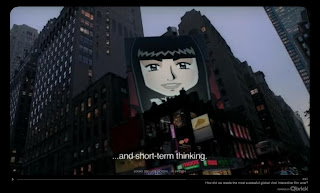
Do you want to be a hero for one day? Go on TackFilm and it will be done in a few minutes.
Click on the image and look at me! (pay attention to the subtitles)

Great video, isn´t it? So why not have fun with your own photo or someone you know and share it with your friends? Enjoy!


Share/Bookmark

Thursday, April 8, 2010

MASTERPIECE YOURSELF!

Do you like art, kids?
At Masterpiece Yourself you can create your own classic painting like Van Gogh´s "Self Portrait", "Mona Lisa" by Leonardo da Vinci, "Girl with a Pearl Earring" by Vermeer...
1- Choose an artist.
2- Upload your photo or avatar.
3- Adjust the image (scale, rotate and center)
4- Name your portrait.
5- Save your creation and send it to your friends.
6- Go to the gallery to see your masterpiece.
7- Learn about the Artists.
Look at my painting. I chose "The Kiss" by Gustav Klimt because he is one of my favourite artists. It´s very romantic. Don´t you think so?

Share/Bookmark

Wednesday, March 24, 2010

CREATE A FUNNY EASTER E-CARD

Muglets is a fun place where you can use your digital pictures (photos or avatars) to put them into Flash animations:
- Choose Easter bunny girl or Easter bunny boy.
- Upload an image from your computer (JPG, GIF or PNG)
- Use the mask tool to scale or rotate the face.
- Name your Muglet.
- Send it to your friends.
Click on the image above and play with my Muglet to see an example. Choose movements and music by clicking on the buttons.
Create yours now, kids!
Have fun!

Share/Bookmark

Thursday, January 14, 2010

AVATARIZE YOURSELF!

Upload your photo into Avatarize Yourself, choose a character, an emotion and a background. Then add a message and send it to your friends!
Look at me as Neytiri, the main female protagonist in "Avatar"
Create yours now!

I finally went to the cinema to see "Avatar" last week. It´s awesome, kids!

Enter the Official Site if you still haven´t seen the movie.


Share/Bookmark

Monday, November 2, 2009

MOON DANCING ANIMATION

Create your own space movie at Space your face: upload your photo, choose a space scenerario and breakdance on the Moon wearing an astronaut suit. Enjoy!

Share/Bookmark

Tuesday, June 9, 2009

CREATE FUNNY PICTURES WITH PIZAP

PiZap is a very fun photo editor that lets you create wacky images easily with your digital pictures. You can add photo effects, change eyes, mouths, noses, hair, ears, add hundreds of original stickers and much more. Finally type something funny in English into the speech bubbles or add colourful phrases from the gallery.
*Remember: save your work sending it to your friends and family or into your computer folders.
Enjoy playing with your pictures!

Share/Bookmark

Sunday, May 24, 2009

CREATE A FUN VIDEO STARRING YOU!

Click on the image and look at me as a super heroine fighting against the evil spaghetti monster in this animated comic strip!
Made up Memories is a fun way for you to share your own videos with family and friends. When you click into the site, you find a room with five different videos. Choose one of them, upload an image of you, your friend or a loved one and send your video by email. Have fun!

Share/Bookmark

Tuesday, May 5, 2009

CARTOONIZE YOUR PICTURES

Have a look at the posters I created of your favourite celebrities Zac Efron and Miley Cyrus.
Be Funky is a funny application that lets you take any photo, from your computer or from the web, and transform it into a sketch or a cartoon. Turn your picture into incredible artwork!
You are going to love this site. Enjoy it!

Share/Bookmark

Monday, April 13, 2009

FACE FUN: A FUNNY APPLICATION

Look at me, children! I was dancing on the moon during my Easter holidays!
You can do that too at 123Peppy Face Fun. You have to upload your photo from your computer into the scene you choose and then you can make the fun by clicking the interaction buttons. Finally, send this fun to your friends. It´s great!

Share/Bookmark